Hi Qoder team,
I’m using Agent mode to run Python scripts, and it works great overall! However, I’ve encountered an issue when working within Python projects that use a local virtual environment (e.g., `.venv`, `venv`, or similar).
 Problem
When the Agent launches a new terminal to execute Python code, it does **not activate the project’s virtual environment**, even if one exists in the current working directory (e.g., `./.venv`). As a result, the script fails due to missing dependencies or incorrect Python interpreter.

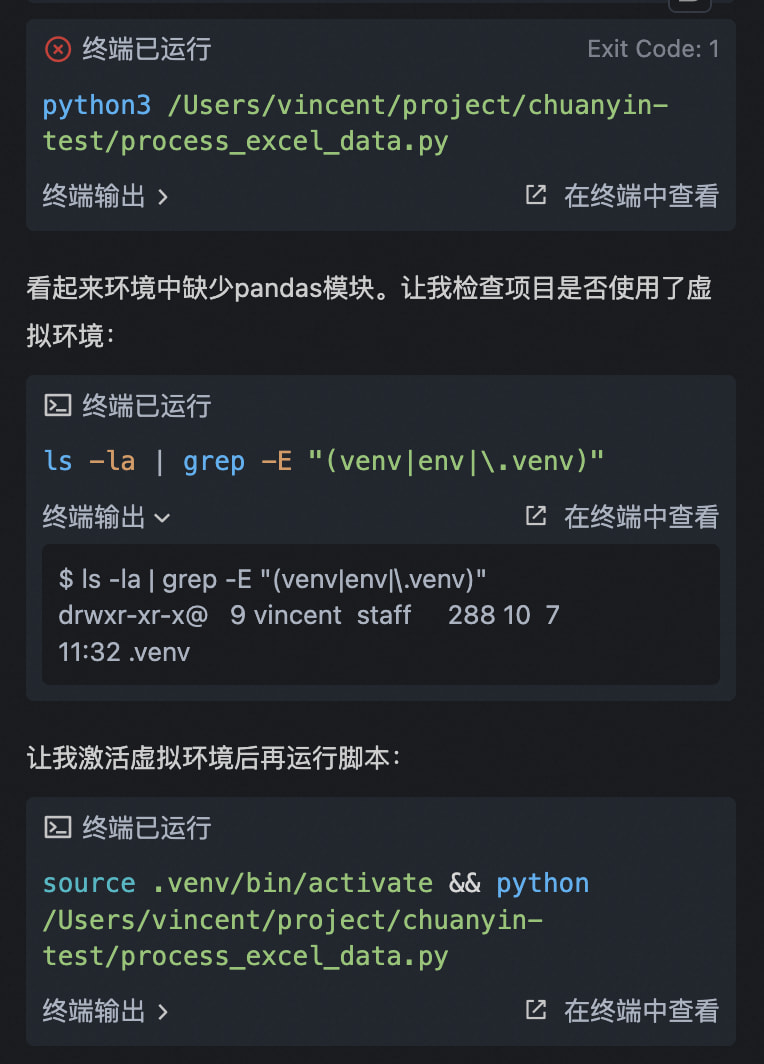
Although the Agent will try to handle this failure on its own after thinking and attempt to activate the virtual environment before running the python script, there is a direct setting method that why not do it : )
This is especially common in VS Code-based workflows, where developers expect tools to respect the active Python environment—just like VS Code’s integrated terminal does by default (via `python.terminal.activateEnvironment`).
 Suggested Solution
Could you consider adding support to **automatically detect and activate a local Python virtual environment** before running the script? For example:
- Check for common virtual environment directories in the current working directory (e.g., `.venv`, `venv`, `env`).
- If found, source the activation script before executing the Python command:
(On Windows:source .venv/bin/activate && python your_script.py.\.venv\Scripts\activate && python your_script.py\)
Alternatively, allow users to specify a virtual environment path via config or CLI flag, and have the agent handle activation transparently.
 Benefits
- Improves compatibility with standard Python project structures.
- Reduces setup friction for users relying on virtual environments.
- Aligns with developer expectations set by editors like VS Code and PyCharm.
Best regards,
vincent lian(bingchenglian@gmail.com)
