Issue Description
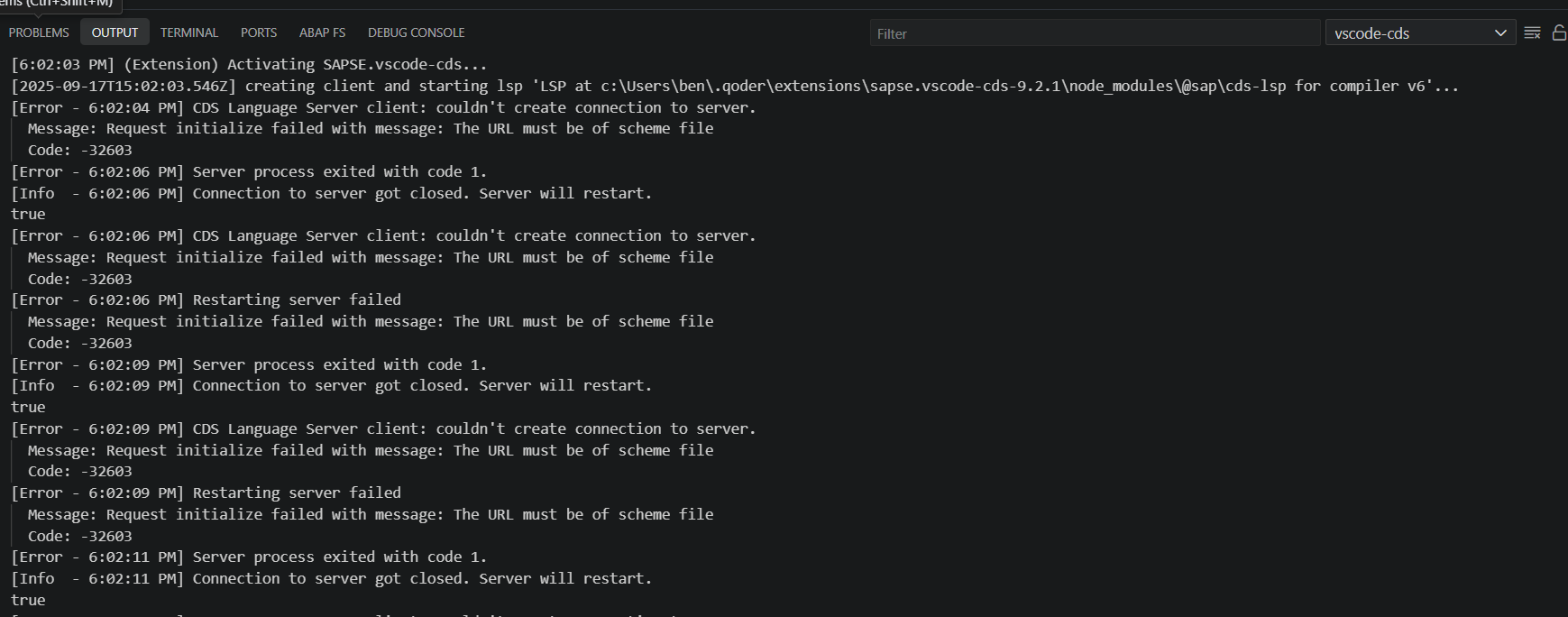
The CDS Language Server in the SAPSE.vscode-cds extension fails to start when using Qoder. The error indicates that the URL must be of scheme file, and the server crashes repeatedly until it is no longer restarted.
Steps to Reproduce
-
Install Qoder and enable the
SAPSE.vscode-cdsextension. -
Open a project with CDS (
.cds) files. -
Observe the extension activation and LSP startup process in the Output panel.
Expected Behavior
The CDS Language Server should start successfully and provide language features (syntax highlighting, code completion, validation, etc.) for .cds files.
Actual Behavior
The CDS Language Server fails to initialize and crashes repeatedly with the following error message:
CDS Language Server client: couldn't create connection to server.
Message: Request initialize failed with message: The URL must be of scheme file
Code: -32603
After several retries, the server stops restarting entirely.
Screenshots / Screen Recordings
Operating System
- Windows 10/11 (please adjust if you’re on Linux/macOS)
Current Qoder Version
Version: 0.2.1
VSCode Version: 1.100.0 (user setup)
Commit: d9d6e6f35de2f3c5ae21bf9cc540bd1228b0473f
Date: 2025-09-12T12:27:10.150Z
Electron: 34.5.1
Chromium: 132.0.6834.210
Node.js: 20.19.0
V8: 13.2.152.41-electron.0
OS: Windows_NT x64 10.0.26100